

Amazon’s New Comparison Feature: A Practical Step Toward Category Benchmarking for Brands
For years, category-level benchmarking has been a major blind spot for many Amazon brands, especially CPG sellers accustomed to syndicated data sources like Nielsen or IRI.
Amazon’s newly introduced comparison feature under Business Reports marks an important shift. It brings sellers closer to in-platform benchmarking, offering contextual insights into performance relative to similar brands and categories.
While it doesn’t fully replace third-party aggregated data, it’s a meaningful step forward, and one sellers should be paying close attention to.
What’s New
Amazon has introduced a comparison feature within Business Reports that allows sellers to:
Compare performance metrics against category or peer benchmarks
View relative performance trends, not just standalone numbers
Identify whether changes in performance are brand-specific or category-wide
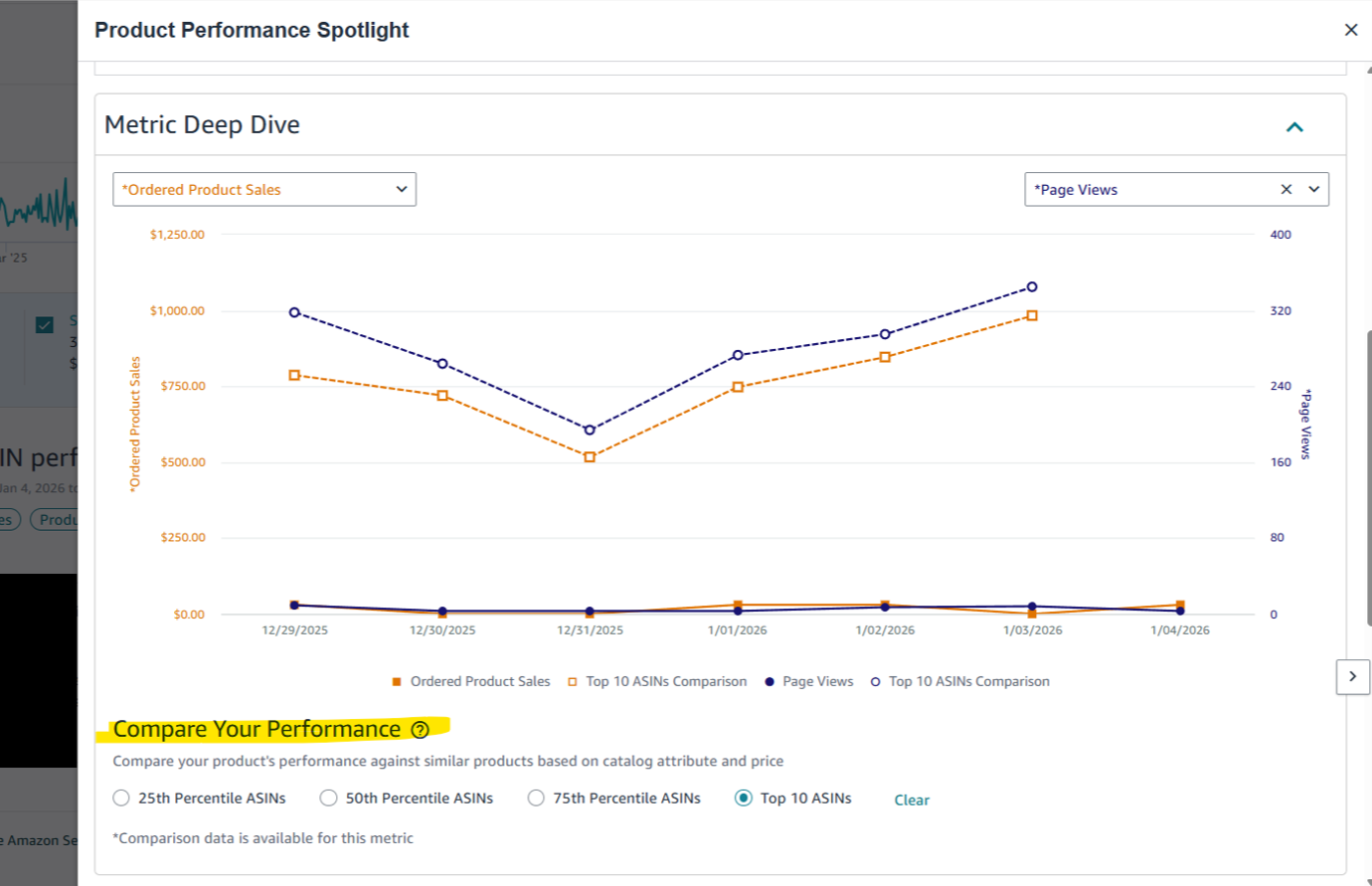
This feature provides a level of insight that was previously difficult, if not impossible, to obtain without extensive manual data manipulation or expensive third-party tools. It’s designed to answer fundamental questions sellers have about their competitive standing.
Why This Matters
This update is a game-changer for several reasons:
Granular Competitive Insight:
No more relying solely on broad industry averages. You can now see how your product's performance metrics compare directly to your competitive set on Amazon. This allows for a much more precise understanding of your market position.
Identifies Growth Opportunities:
By highlighting areas where competitors are outperforming you (or where you're excelling), this feature pinpoints specific opportunities for optimization. Is a competitor driving more traffic? Do they have a higher conversion rate? These insights are gold.
Data-Driven Decision Making:
Move beyond guesswork. This feature empowers brands to make strategic decisions based on hard data, whether it's adjusting pricing, optimizing listings, or refining advertising strategies.
Efficient Benchmarking:
What used to be a laborious process of data collection and analysis is now streamlined, integrated directly into Amazon's seller tools. This saves valuable time and resources.
Pro Tips from Xtended.GH
Leveraging this new comparison feature effectively requires a strategic approach. Here are our top tips to help your brand maximize its potential:
Use comparison data to validate trends, not replace deep analysis
Pair benchmarking insights with operational metrics (inventory health, listing readiness)
Watch for sustained gaps vs short-term fluctuations
Document insights regularly, benchmarking only works when tracked over time
Context turns data into decisions.
How Xtended.GH Can Help
At Xtended.GH, we support sellers by translating performance data into backend action.
Our backend operations support includes:
Monitoring and structuring Business Reports data
Helping sellers interpret benchmarking signals operationally
Aligning inventory, listings, and backend workflows with performance insights
Ongoing reporting support to ensure data is consistently reviewed and acted upon
We don’t sell dashboards, we help sellers use the data they already have, better.
Get in Touch
Benchmarking is only valuable when it leads to action. If you want help interpreting Amazon’s performance data and aligning it with your backend operations. Selling Online? Book an Appointment and let us handle the backend while you focus on growing your brand.
Final Thoughts
Amazon's new comparison feature is a powerful stride towards providing CPG brands with the actionable, category-based benchmarking data they've long desired. By integrating this into your analytical toolkit and pairing it with robust backend operational support, you can unlock significant growth opportunities and solidify your competitive edge on the world's largest e-commerce platform.